
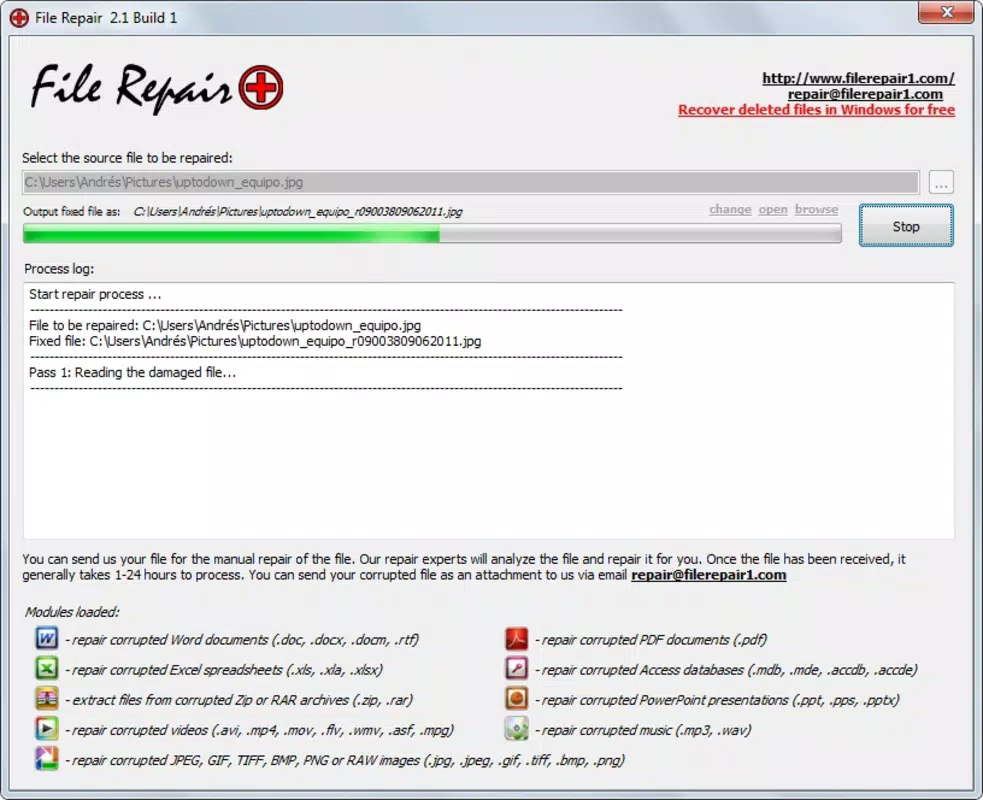

Download File Repair – repair corrupted files, recover damaged documents, fix broken files, restore lost data, recover files from memory card
Overview
File Repair is a productivity-focused mobile application designed to assist users in recovering files that have become corrupted due to various causes, including malware infections, sudden system crashes, or improper file transfers. The app aims to restore functionality to damaged files across multiple formats, making it a practical utility for individuals who rely on digital content stored on their smartphones or memory cards. Its primary purpose is to offer a straightforward solution for users who may lack technical expertise but still need to retrieve essential data such as photos, audio recordings, text documents, spreadsheets, and videos.
The target audience includes everyday smartphone users, students, professionals, and content creators who frequently store and manage digital files. Given the widespread use of mobile devices for both personal and work-related tasks, the ability to recover corrupted files can significantly reduce data loss stress and downtime. While the developer, File Repair, has not provided additional background details, the app’s long-standing presence since its release on June 4, 2011, suggests a level of continuity and user trust over time.
Real-world use cases include recovering a critical presentation file after a system error, restoring a cherished photo from a damaged SD card, or retrieving a voice memo that was rendered unreadable. In the broader app ecosystem, File Repair fills a niche role as a lightweight, accessible tool for file recovery—especially in environments where more advanced recovery software is impractical or unavailable.
Key Features & Functionality
- Wide File Type Support: The app supports a broad range of file formats, including common image types such as .jpg and .png, audio files like .mp3 and .wav, and document formats including .doc and .xlsx. This versatility ensures that users can attempt recovery for most frequently used file types.
- User-Friendly Interface: Designed with simplicity in mind, the interface allows users to select a damaged file directly from their device’s storage and initiate the repair process with a single tap. This low barrier to entry makes it accessible to non-technical users.
- Quick Repair Process: The repair operation is optimized for speed, often completing within seconds when the damage is minor. This efficiency helps users regain access to their files promptly, minimizing disruption to daily workflows.
- Memory Card Recovery: File Repair is capable of scanning and attempting to repair files stored on external memory cards, a feature particularly useful for users who rely on SD cards for expanded storage.
- Non-Invasive Repair: The app operates without modifying the original file unless necessary, reducing the risk of further data corruption during the recovery attempt.
For example, a user who accidentally deletes a .xlsx file from their phone’s internal storage can use File Repair to scan the device and attempt to restore it. Similarly, someone who transfers a large video file from a computer to an SD card and finds it unplayable can use the app to analyze and repair the file structure.
Interface, UX & Performance
The user interface of File Repair is described as straightforward and minimalistic, focusing on core functionality without unnecessary distractions. Navigation is linear: users select a file from their device’s file system, initiate the repair process, and receive feedback on the outcome. The layout prioritizes usability, with clear labels and intuitive buttons that guide users through each step.
Visual design elements are basic but functional, relying on standard mobile UI components rather than advanced animations or custom graphics. This approach ensures compatibility across a wide range of Android devices, including older models. The app responds promptly to user input, with minimal lag during file selection and repair initiation.
Although the developer did not list formal performance metrics, the app’s lightweight size of 4.5 MB suggests it is optimized for low-resource environments. It is expected to run efficiently on devices with modest processing power and memory. Stability appears consistent based on its long-term availability, though users should be aware that repair success depends heavily on the extent of file damage.
Platform Compatibility & Technical Requirements
File Repair is available exclusively on the Android platform. The current version is 1.0.2, and the app occupies 4.5 MB of storage space. It is offered as a free download, with no in-app purchases or subscription fees reported.
The developer did not specify minimum OS requirements or compatibility details for different Android versions. As such, users should ensure their device meets general Android standards for running basic utility apps. The app’s age—released in 2011—raises questions about modern compatibility, especially with newer Android security models and file system permissions. However, its continued availability suggests it remains functional on many current devices.
Pros and Cons
Pros
- Free to download and use with no hidden costs
- Supports multiple file types including images, audio, documents, and videos
- Simple, intuitive interface suitable for non-technical users
- Lightweight design with minimal storage footprint
- Capable of repairing files stored on memory cards
Cons
- Repair success is not guaranteed and depends on the severity of file corruption
- Developer did not provide detailed technical specifications or compatibility information
- App has not been updated since 2011, raising concerns about long-term support and security
- No cloud integration or backup recovery features
- Limited feedback or diagnostics during the repair process
FAQ
Is File Repair safe to install on my Android device?
Yes, the app is available for free and does not require root access. However, users should ensure they download it from a trusted source to avoid modified or malicious versions.
Can I use File Repair to recover files from my SD card?
Yes, the app is capable of scanning and attempting to repair files stored on external memory cards, which is useful for retrieving damaged media or documents.
Does File Repair guarantee 100% recovery of corrupted files?
No, the app does not guarantee full recovery. Success depends on the extent of file damage, and some files may be irreparable.
Is File Repair compatible with the latest Android versions?
The developer did not disclose compatibility details. While the app may work on modern devices, its last update was in 2011, so performance on newer systems cannot be assured.
How often is File Repair updated?
As of the latest release on June 4, 2011, the app has not received any updates. Users should be cautious about relying on it for critical data recovery.
Final Thoughts
File Repair remains a niche yet functional tool for users seeking a simple way to recover damaged files on Android. Its broad file type support, ease of use, and lightweight design make it a practical choice for basic recovery tasks, especially for those without access to more advanced software. While its age and lack of updates are notable limitations, the app continues to serve a purpose for individuals managing everyday digital content.
It is most beneficial for users who need a quick, no-cost solution for minor file corruption, particularly when dealing with images, audio, or documents stored on internal storage or memory cards. However, it should not be relied upon as a primary backup or recovery strategy. Maintaining regular backups is still the most reliable way to protect important data.
For those facing file corruption and looking for a straightforward, free utility, File Repair offers a viable starting point. Download File Repair now


